Blog > Teams and Workspaces in QR Penguin
8 minute read
By the QR Penguin Team · Published May 24, 2026
Introducing Teams & Workspaces: Next-Level Collaboration on QR Penguin
A major upgrade has officially landed on QR Penguin! We are thrilled to introduce Teams and Workspaces - a powerful multi-tenancy suite designed to help your business collaborate seamlessly, organize assets, and scale your QR code operations securely.
Whether you are an agency managing multiple client brands or a growing company coordinating across internal departments, these new features will completely transform your day-to-day QR workflows.
1. Navigating Your New Workspaces
We designed this multi-workspace ecosystem to stay completely out of your way until you need it.
When you are working inside your default environment, you will see our familiar QR Penguin branding at the top of your screen under the main header. However, the moment your organization scales to multiple workspaces, that header dynamic changes to display the exact name of the workspace you are currently inside.

Switching environments takes just two clicks. By clicking on the active workspace name, a clean dropdown menu appears listing all the other workspaces you have access to. Simply select your destination, and your entire dashboard instantly shifts contexts.
2. Streamlined Team Management & Ironclad Security
Navigate to your Settings page, and you’ll find two powerful new tabs designed to give you total control over your organizational structure.
The Team Members Tab
This tab gives you a bird's-eye view of everyone inside your organization. From here, you can see their name, email, and specific workspace permissions at a glance.
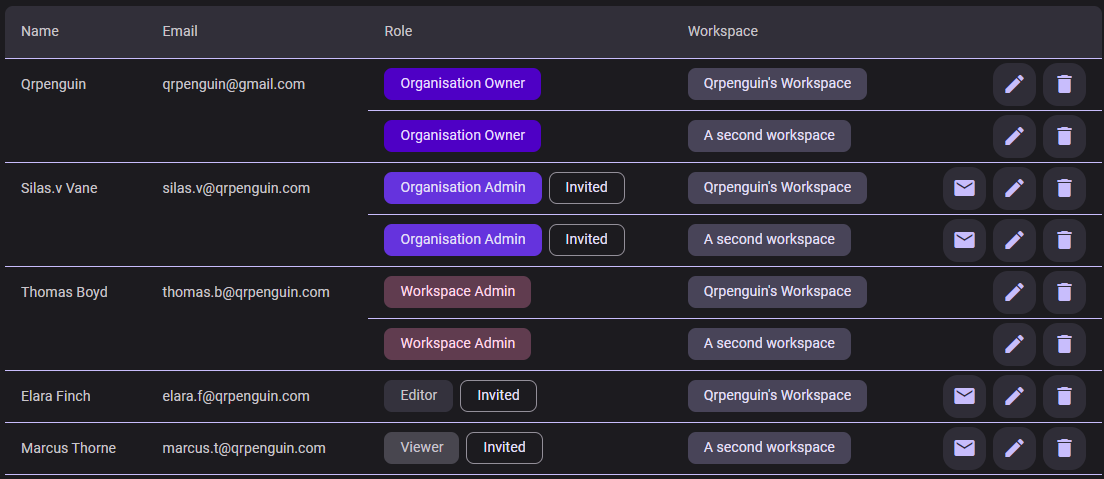
To keep your digital assets secure, we've introduced four precise user roles:
- 👑 Owner: The ultimate authority. Only one person holds this role, granting them full administrative and billing access across the entire organization.
- 🛠️ Admin: A powerful manager role. Admins inherit all Editor permissions and can also invite, remove, and manage members within their specific workspace.
- 📝 Editor: The builder role. Editors can fully manage QR codes, custom domains, design templates, and integrations—everything except team member management.
- 👁️🗨️ Viewer: The read-only role. Viewers can navigate pages, analyze metrics, and download QR codes, but cannot modify or delete anything.
Strict Data Isolation
Security is our top priority. Workspaces act as completely isolated silos. An Editor assigned to Workspace A cannot see, edit, or interact with any QR codes inside Workspace B unless an administrator explicitly grants them at least a Viewer role in Workspace B. This makes QR Penguin perfectly safe for agencies handling sensitive, confidential data for competing client brands.
Seamless Onboarding: Single Invites & CSV Bulk Import
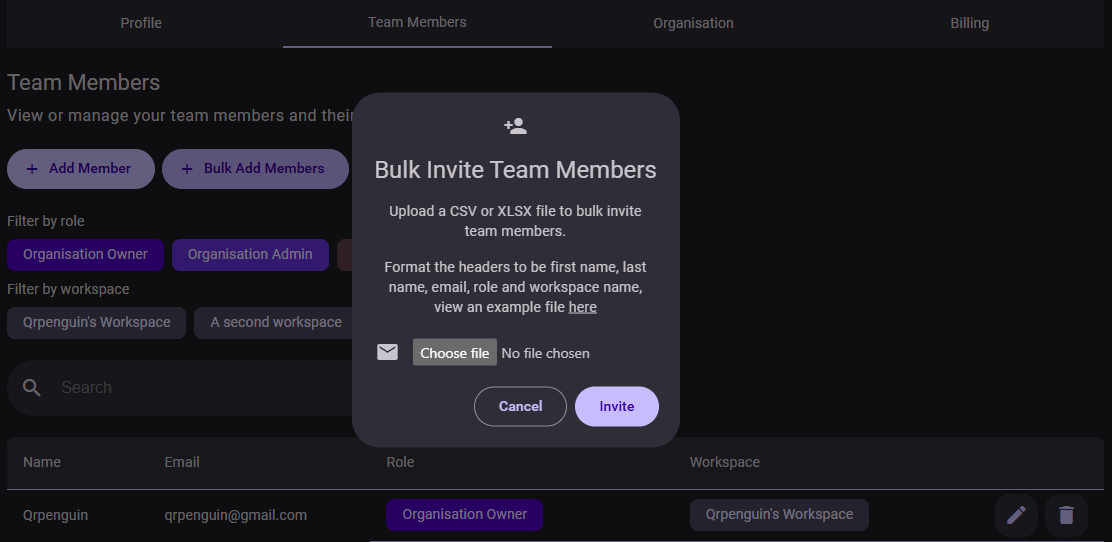
Growing your team is entirely frictionless. You can invite colleagues one by one or onboard entire departments simultaneously using our new CSV bulk import feature.
Once invited, your team members will receive a beautiful, secure email invitation containing a direct link to join their designated workspace(s).
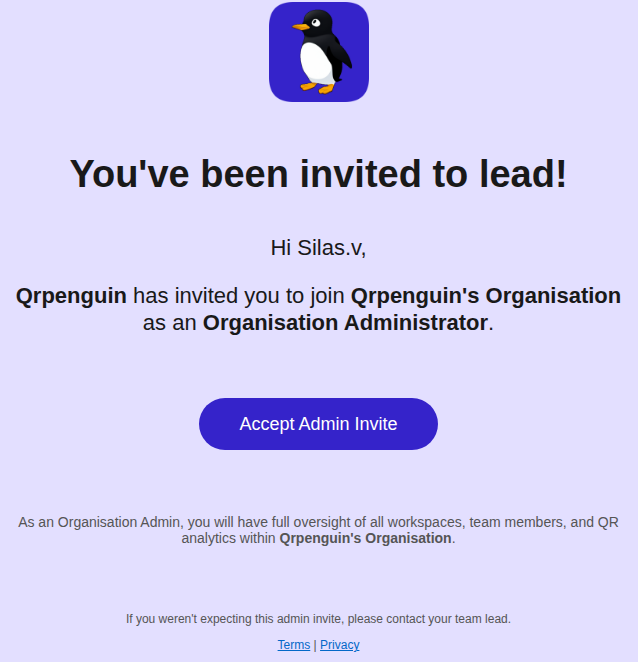
If they are new to QR Penguin, they’ll be guided to quickly set up an account; if they are an existing user, the new workspace will instantly be appended to their header switcher. Need to prompt someone who missed the email? You can safely trigger a fresh invite link every 5 minutes.
3. Centralized Governance: The Organisation Tab
For high-level overview and administrative control, the new Organisation tab serves as your executive command center.
Global Analytics & High-Level Actions
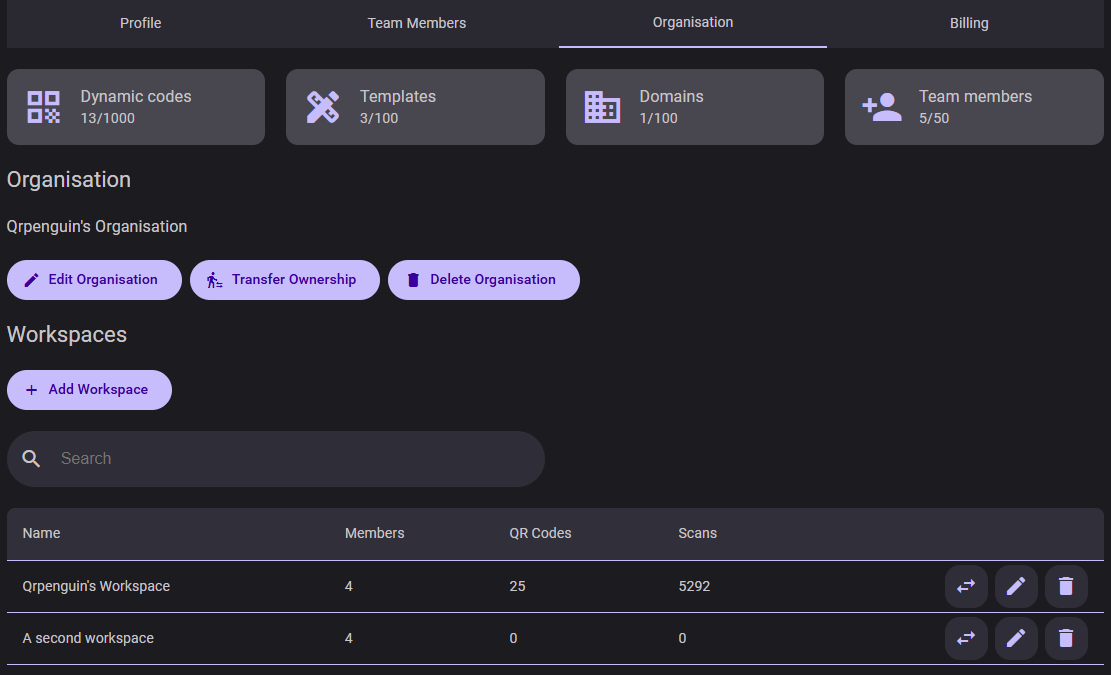
Instantly audit your system footprint. See your real-time consumption against your plan limits, including total dynamic QR codes utilized, design templates, connected custom domains, and team member seat counts.
From this tab, you can also update your organization's legal name, securely transfer ownership to another trusted teammate, or completely delete the organization if a project wraps up.
Advanced Workspace Management
Within the same view, you can spin up entirely new workspaces or rename existing ones. Every workspace row displays its own standalone metrics for assigned members, total QR codes created, and real-time scan counts.

💡 Pro-Tip for Power Users: When utilizing multiple workspaces, a new macro-tier role automatically unlocks: the Organisation Admin. These users are granted full Workspace Admin rights globally and are authorized to create, modify, and manage workspaces directly from this Organisation page.
4. Team & Workspace Billing Plans
Teams and Workspaces features are available exclusively on our paid tiers. Seat and workspace allowances scale dynamically based on your subscription:
- Professional Plan: Perfect for small teams. Includes up to 5 team members and 2 distinct workspaces.
- Enterprise Plan: Built for large corporate structures and agencies. Includes up to 50 team members and 5 distinct workspaces.
Ready to upgrade your workflow? Head over to your account billing tab to unlock collaboration features for your team today!